Adding GC and Customer Contacts to Podio
Why Add Contacts?
The Contacts app stores information about General Contractors (GCs), subcontractors, suppliers, and customer contacts. Having their info in Podio means:
- Quick access to phone numbers and emails
- You can link them to projects they're involved in
- Everyone on your team can see who's who
How to Add a New Contact
Step 1: Open the Contacts App
- In Podio, click on the Precision Projects workspace (top navigation)
- Find and click the Contacts app (Master Database)
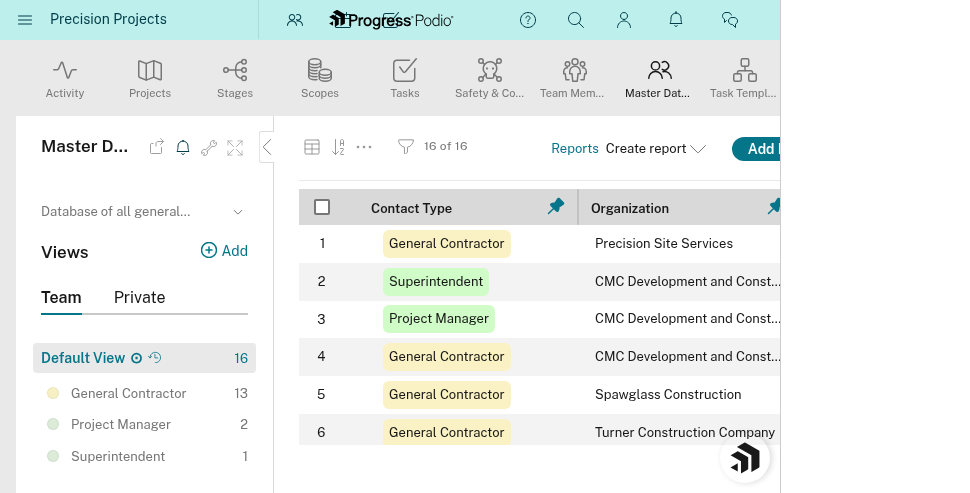
Step 2: Create the Contact
- Click the "+ Add" button (or "Add item")
- Fill in the contact's information:
Required Fields:
- Name: Full name (e.g., "Sarah Johnson")
Recommended Fields:
- Job Title: Their role (e.g., "Project Manager", "Site Superintendent")
- Organization: Company they work for (select from dropdown or add new)
- Email: Their email address
- Phone: Direct phone number
- Address: Office or site address if relevant
- Notes: Anything helpful (e.g., "Prefers text over email", "Handles all RFI responses")
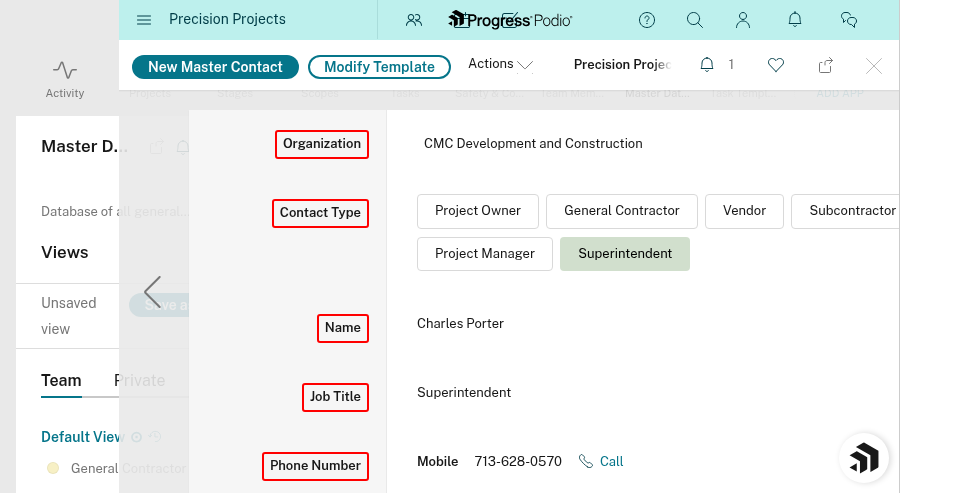
Step 3: Save
Click "Save" or "Create" (depending on Podio version).
Your contact is now in the system!
Tips for Good Contact Management
✅ Use full names: "Sarah Johnson" not "Sarah" (you might work with multiple Sarahs)
✅ Add job titles: Helps you remember who does what ("GC Project Manager" vs. "Safety Coordinator")
✅ Keep notes updated: If they change roles, prefer certain communication methods, or have quirks, write it down
✅ Pick the right Organization: This groups contacts by company, making it easier to find "everyone from ABC Construction"
Common Questions
Q: What if the person works for multiple companies?
A: Pick their primary company for Organization. Mention the other companies in the Notes field.
Q: Can I add internal PSS employees as contacts?
A: You can, but it's usually not necessary. Internal people are assigned via the User fields (PM, OC, FOCS, Foreman) on projects. The Contacts app is mainly for external people.
Q: What if I don't have all their info yet?
A: Add what you know. You can edit the contact later to fill in missing details.
Q: How do I find a contact later?
A: In the Contacts app, use the search bar at the top. Search by name, company, or even phone number.
What's Next?
After adding a contact, you'll probably want to link them to a project so you can quickly see who's involved in each job.
👉 See: Linking Contacts to Projects
Related SOPs
- PSP-104: Communication Best Practices
- PSP-101: Creating a New Project (includes linking contacts)
Need help? Ask your OC or PM. They can show you where existing contacts are or help you add new ones.